Project surfaces
A family of main-area views, mutually exclusive, alongside the editor. All of them read project state from disk on demand — no indexer. (Codebase config used to be one of them; it now lives in the Settings window — see below.)
Overview (⌘⇧H)
The project front page: a serif title and README headline, then a live status board and a "Lately" thread of recent commits. Prose first, chrome second.
The status board is three clickable cards that read off state Kiln already tracks:
- Working tree —
clean, or3 changed · 1 newwith the branch underneath; opens the Changes surface. - Squad — pending proposals, otherwise the agent count or
idle, with arunning…or unseen-count hint; opens the squad panel. - Inbox — a one-click hop to the aggregated issues / TODOs / CI surface.
Below the board, Pick up where you left off lists the working tree's recently touched files — uncommitted changes first, then files from recent commits, deduped and capped — each one click from the editor. The order comes from git (git status plus git log --name-only), so a checkout doesn't scramble it the way raw file mtimes would.
Inbox (⌘T)
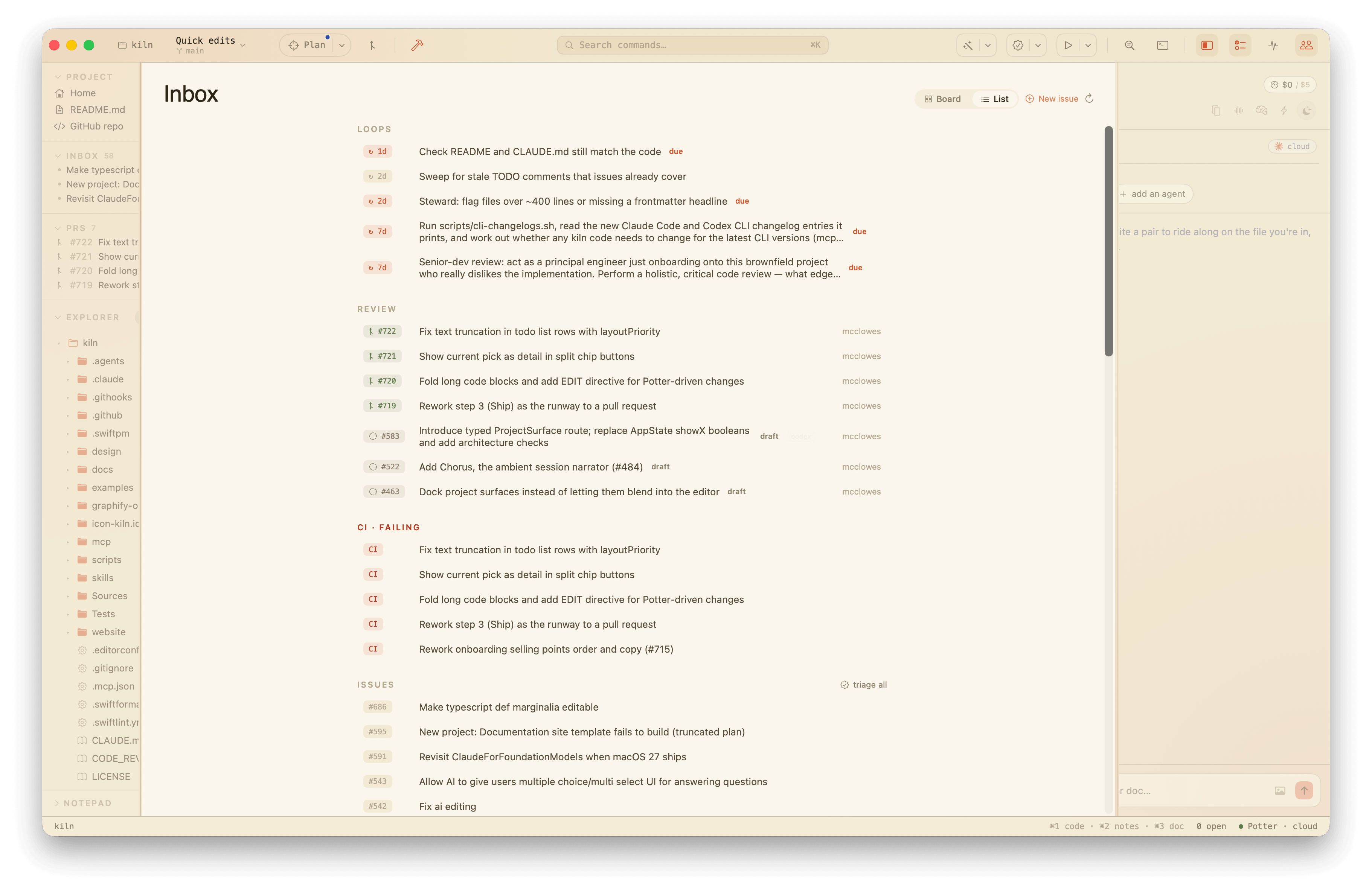
The Inbox is the funnel — one view of what the project says needs doing, wherever it said it, before any of it is committed to. The signals it gathers are still your to-dos; the surface that holds them is the inbox:
- open GitHub issues (via the
ghCLI), - TODO.md checkboxes,
- TODO/FIXME comments found in code (a bounded walk, on demand),
- open pull requests waiting on you — the ones your review is requested on, plus your own out for review — merged and deduped (via
gh), - and due loops from
.kiln/loops.json— recurring tasks the project declares and commits, with last-run times kept locally in.kiln/loops.local.json(gitignored).
The first time you open a repo, the view leads with a single set up Kiln with <repo> card. Kiln doesn't fit a fresh repo yet — nothing's gitignored for its *.local.* machine state, there's no project .kiln/config.json, no coding-agent wiring — so this nudge hands an agent the brief for exactly that: gitignore hygiene, a small starter config, and registering Kiln's MCP server and companion skill. Send it to an agent (the usual model picker applies) or dismiss it with the ✕; either way it's retired for this repo and won't return. It also bows out on its own once the repo carries a committed .kiln/config.json — the artifact setup produces — so a repo set up elsewhere never nags. The "I've handled this" flag is machine-local, keyed by the resolved path, like workspace trust.
When the squad is working, an agents · working section sits at the top: one row per active agent run, showing what each agent is doing right now (reading, thinking, writing), the task or file it's on, and where, so the to-dos view doubles as a live tasks board. Tapping a row opens the squad panel to watch or steer it.
Every row carries the same split button on hover (see Plans below): its primary verb threads the signal into a plan — add to plan onto the current one, or make a plan when there's none — and its chevron holds hand off to an agent (with its model-tier picker) plus, for issues, vet and scope. So any row can become a plan, a step, or a squad job without retyping. Issue rows and failing CI runs also get an "open" button on hover that opens the issue (or run) on github.com — the issue URL is derived from the repo's origin remote. A failing CI run also gets a dismiss (✕) on hover: the red ✗ is a nudge, not a record, so once you've handled a run you can clear it and it stays hidden until that run id fails again. Dismissals are machine-local — they live in .kiln/ci-dismissed.local.json (gitignored), and they don't touch the run on GitHub.
A List / Board toggle sits in the top-right of the header. List is the default — the stacked, sectioned view above. Board lays the same signals out as a kanban, four lanes that scroll sideways: Backlog (the setup nudge, open issues, external items, unchecked TODO.md boxes, in-code TODOs, and loops that aren't due), In progress (agents the squad has working right now, plus due loops), Review (open PRs waiting on you — your review requested or your own out for review — plus failing CI runs), and Done (ticked TODO.md boxes). The cards are the same rows, so every hover action — send an agent, open, dismiss — works either way; the board is a second arrangement, not a second feature. Your choice of layout is remembered across launches. Lanes always show even when empty, so the board reads the same shape whatever the project's state.
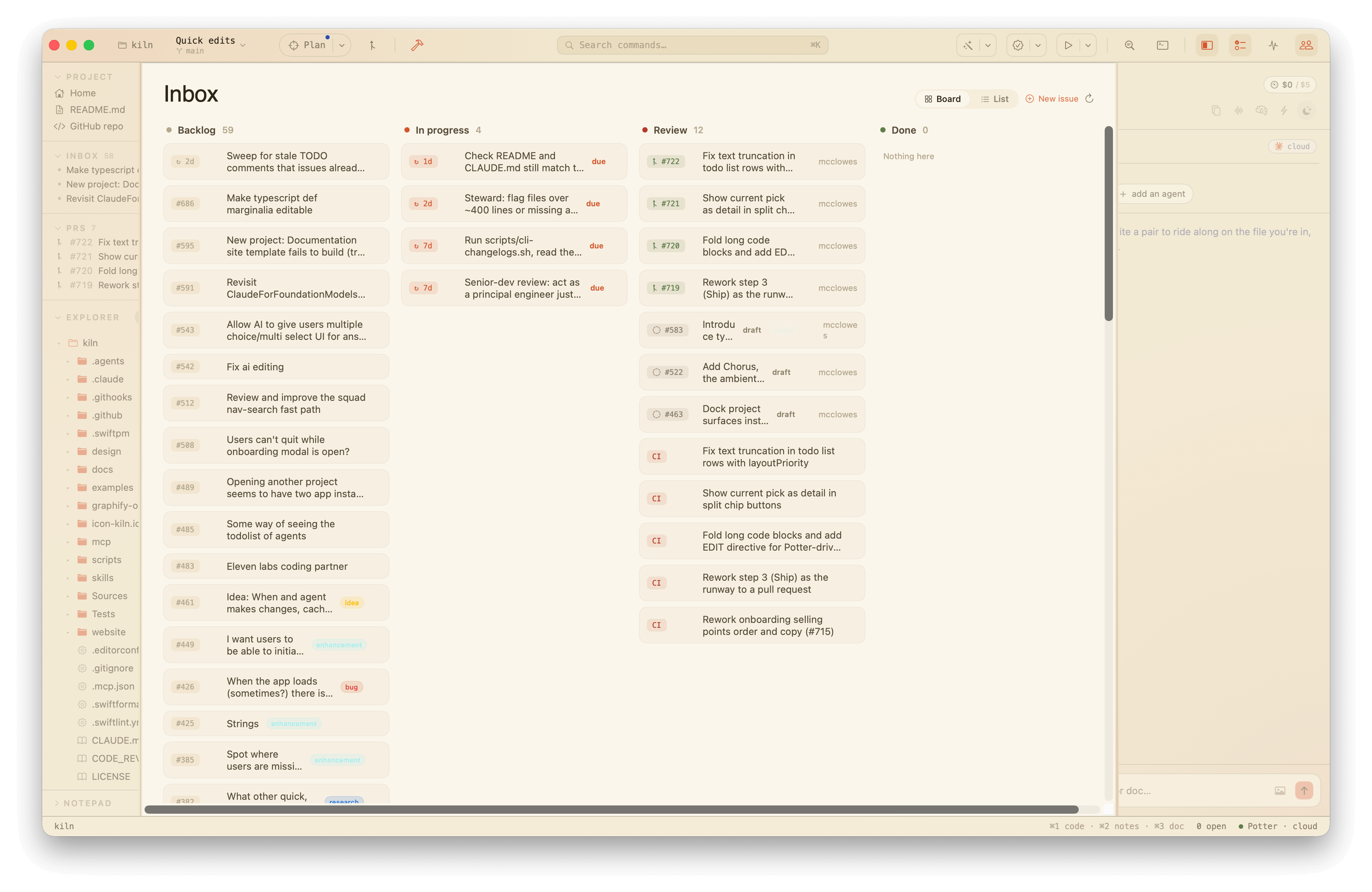
Issue rows carry their GitHub labels as small colored chips, in the repo's own label colors, so the state of each issue reads at a glance — and a row with no chips is itself a signal that nobody has triaged it. The ISSUES header has a triage all button that hands every open issue to the squad for on-device vetting in one click; it's capped (eight at a time) so the click stays within reason, and it runs through the same per-issue vet path — labels applied, clarifying questions posted.
A loop can also self-run. Mark it "auto": true in loops.json and turn on the global autoLoops flag in .kiln config, and that loop fires when due without a click — through the same squad path the button uses, so its proposals stay buffer-only. It's off everywhere by default; both the per-loop opt-in and the global flag have to agree before anything runs unattended.
A loop's title is the brief handed to the agent, so a loop can point at a checked-in script and let the agent reason over its output. The shipped CLI changelog watch (every: 7d) monitors for updates to external tools the project depends on and brings news back to you when there's something to act on.
Two of these sources can be added to from the command palette (⌘K): New GitHub Issue… takes a one-line title and files it with gh (the result lands in the squad feed), and Add a To-do… appends a - [ ] … checkbox to TODO.md and jumps you to this view. Both reload the to-dos when they're done. The New issue button in the Inbox header is the same flow, one click away from where the issues already live.
The aggregation runs once as soon as a project opens, not just on your first visit, so the to-dos are already gathered the first time you flip to the view. It's also cached, so flipping to the to-dos view and back doesn't re-run the whole thing each time. The local sources (TODO.md, code comments, loops) and the remote ones (gh issues, failing CI) have their own short freshness windows; the cheap local scan refreshes more often than the network calls, and the cache survives surface switches because it lives on the app, not the view. The refresh button — and any deliberate project refresh — always reloads everything.
Changes (⌘⇧C)
The version-control view: the current branch, the working tree's changes (each with a plain-language label — "modified", "new", "added" — and the raw porcelain code a hover away), and recent commits, read straight from git status and git log on demand.
It writes, too. The porcelain's index-vs-working-tree split is surfaced as two sections — staged above, changes below — and every row has a stage (+) or unstage (−) button, plus a "stage all" / "unstage all" on each header. Staging reuses the diff view's explicit, additive git add -- <paths> (never git add -A, so an agent's untouched work never rides along); unstaging is git restore --staged -- <path>. Paths go through git as explicit argv entries, never interpolated into a shell, so spaces and quotes can't break out. When anything is staged, a commit box appears: type a message and commit the staged set (via the same quoting-proof git commit -F - the diff view uses). If the branch name carries a leading issue number (180-slug, issues/180-slug), the commit picks up a Refs: #180 trailer automatically, alongside Co-Authored-By for agent-assisted work. The terminal stays the escape hatch for what this surface doesn't cover (rebases, conflict resolution, hunk-level staging).
Opening the surface fetches first. Because the "behind" count and the local-vs-remote picture are read from remote-tracking refs — and Kiln never used to fetch on its own, so they were only ever as fresh as your last manual git fetch — opening Changes kicks off a background git fetch --prune (refs only: no merge, no rebase, nothing that can touch your working tree), then redraws the remote picture against it. A small syncing… spinner in the header marks it in flight; the local picture renders immediately and doesn't wait. It fetches when the surface opens and on the manual refresh, but not on the internal refreshes a stage or commit fires. A repo with no remote skips it silently.
It also closes the loop to a pull request. A local vs remote block sits between the working-tree changes and the recent commits: a plain-language line for where the branch sits — 2 to push · not on remote yet, 1 ahead · origin/feature, or in sync — and the recent-commits list marks the commits that haven't left the machine with an amber dot and a local tag, so pushed and unpushed read apart at a glance (git log --oneline origin/<base>..HEAD, or against the upstream once there is one). Two buttons live there: Push (git push -u origin <branch> — the honest push, upstream set in one go) and Open PR, the one-click ship. Open PR carves a topic branch when you're sitting on the integration branch — you can't PR main into main, so it runs git switch -c <slug>-<hash> off your commits and resets main back to its upstream, leaving local main clean — then pushes and opens the PR with gh pr create --fill (title and body lifted straight from the commits, no typing). On success you land on the Pull requests surface, the next step. A PR that's already open for the branch is reused, not re-created. Stash, pull, and creating/deleting branches by hand stay in the terminal; branch switching and ahead/behind already live in the title bar.
Changes, Feedback, and Plans share one Plan split button in the title bar — they're three steps of the same arc (the local PR): plan what you're building, review changes as they pile up, then review & ship the whole diff against the plan. The button's left half enters the flow; its chevron drops a menu that walks the three steps, each carrying a badge that says where the work is — the plan's checklist progress (or a nudge to start one), the count of changed files, and the commits waiting to ship. The collapsed button shows a corner badge for whichever step most wants attention next: the count of changed files when there are working-tree edits (modified plus new/added and renamed, deletions aside), commits ahead once those are committed, or a dot to start a plan when the tree is quiet. It all refreshes on the same beat that mirrors session state, so it stays live as you edit, and the badge clears when there's nothing pressing.
The title bar also shows the current branch as a dropdown, next to the project name in the top-left. It lists the repo's local branches, freshest first; pick one to check it out and reload clean buffers from disk (dirty buffers are kept as-is). Like the change badge, it refreshes on the session-mirror beat, so it tracks branch switches made in the terminal.
To keep the list from filling up with dead agent branches, branches that haven't had a commit in 90 days fold under a "Show N older branches" row at the bottom — still one click away, never hidden outright. The current branch and trunk branches (main, master, develop, trunk) always stay in the open list no matter how old, and a branch git can't date is always shown. Tune the window with staleBranchDays in .kiln config (default 90; set 0 to fold nothing and show every branch).
When the branch has drifted from its upstream, the dropdown grows a small amber indicator: a down-arrow with the count of commits to pull, an up-arrow with the count to push, either side hidden when it's zero. The drift is read from git rev-list --left-right --count @{upstream}...HEAD on the same beat, so it stays live as commits land on either side. A branch with no upstream of its own still nudges: it falls back to counting commits ahead of the remote's default branch (origin/HEAD, else origin/main), so a fresh, never-pushed branch shows an up-arrow rather than nothing. The menu repeats it in words ("2 behind, 1 ahead upstream") as a header. The drift indicator stays a nudge, not a button — pushing and opening a PR live one surface over, in Changes.
Centered in the title bar sits the command bar: a search field that opens the command palette (the same one ⌘K raises). It's a launcher, not a second search surface — clicking it hands off to the full palette, where the typing, fuzzy ranking, and the Ask the squad: … fallback all live. So the palette is reachable by mouse from the middle of the chrome, not just the keyboard.
To the right, the title bar offers a group of quick-action icons for the project's own tooling: lint/format, run tests, and build/run. Each one resolves to a command the project already defines — a Makefile target, an npm script, or a SwiftPM verb — so Kiln borrows the tooling rather than reimplementing it, and a slot with no matching command is hidden rather than greyed out. Clicking an icon fires the job in a hidden shell, where it surfaces as a chip in the jobs strip like any palette-run job; the tooltip names the exact command.
Feedback (⌘⇧R)
The local pull-request view: GitHub's "Files changed" tab, in the IDE. Pick a base branch and see everything the current branch adds on top of it — file by file, hunk by hunk, syntax-highlighted, with line numbers down the gutter. Working-tree edits are folded in, so it previews the PR you'd open right now.
It's laid out as a real review screen: a pinned header with an Overview / Code / Visuals tab toggle, the chosen view in the middle, and a pinned footer carrying the two review verbs — Save changes and Request changes. Together they make the diff a round-trip loop with an AI author: read the change, mark what's off, and either save it or send it back.
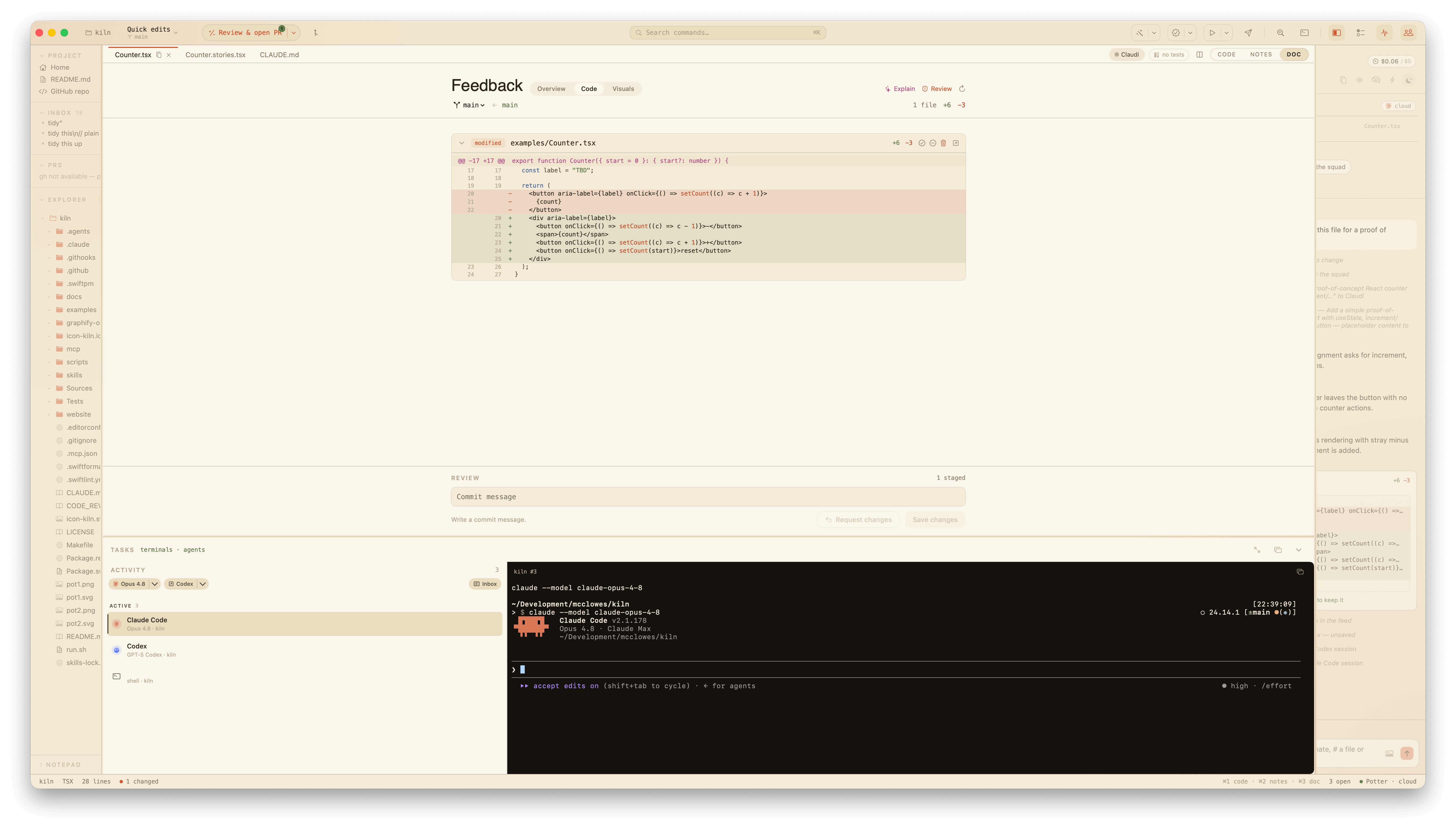
Reach it from the Plan split button in the title bar — it's the flow's last step, Review & ship — the Diff command, or ⌘⇧R.
There's nothing to review on a clean tree, but the surface still earns its place: every tab is reachable with an empty diff, so you can leave feedback on the app as it stands — on the project as a whole (Overview) or on the rendered UI (Visuals) — without first making a change. The footer's review verbs appear the moment there's something to act on: files to commit, or a comment (on the code, the rendered UI, or the project) to send back.
You can review and act without leaving it:
-
Save changes. Write a message in the footer and Save changes commits the approved files. Staging is explicit and additive — Kiln runs
git addon exactly the files you keep, nevergit add -A, so an agent's untouched work never rides along by accident. The message goes togit commit -F -over stdin, so quotes and newlines in it need no escaping. Saving first flushes any applied-but-unsaved buffer edits for those files to disk, so an agent proposal you accepted is persisted before it's committed — "save changes" means what it says. -
Comment on the lines. Selecting a run of diff lines now offers Comment beside Explain: leave a note for an agent, pinned to those lines, in the right margin. The file header shows a count of the comments on it. Comments are the keystone — the same shape whether you leave them on the code or, in the Visuals tab, on the rendered UI. They also survive a relaunch: comments persist per branch to
.kiln/review-comments.local.json(per-user and gitignored, the same.local.jsonconvention plans use), so a review you start today is still there tomorrow, and another branch's review never bleeds into this one. -
Request changes. When you've left comments or held files back, Request changes bundles them into a brief and hands it to the squad — one worker per touched file, through the same review path the architect's workers use, proposing buffer edits you re-review. The diff updates as the proposals land, and you iterate until you save. Loose visual feedback with no source file rides along as extra context; pure-visual feedback falls back to a scout. (Bigger asks can still be escalated to a full Claude Code session via the existing handoff.)
-
Overview tab. Feedback on the project as a whole, no diff required: a light summary line, a one-click Ask AI that gives the codebase a fresh-eyes read (the project's own docs plus its top-level layout, since Kiln doesn't index), and a composer for whole-project notes. Each note is a review comment with no file of its own, so it rides "Request changes" to the squad as context a scout works from — the same path loose visual feedback takes.
-
Visuals tab. The counterpart to reading code: the rendered UI, with pinned visual feedback (the
Feedback/engine, embedded). Every reviewable surface — Kiln's own screens plus any imported screenshots — is a row in a scrolling list, each collapsed until you open it; one opens at a time, so only what you're looking at is rendered. A code diff tells you what changed; the visuals tell you whether it looks right. Comments left here join the same set "Request changes" sends.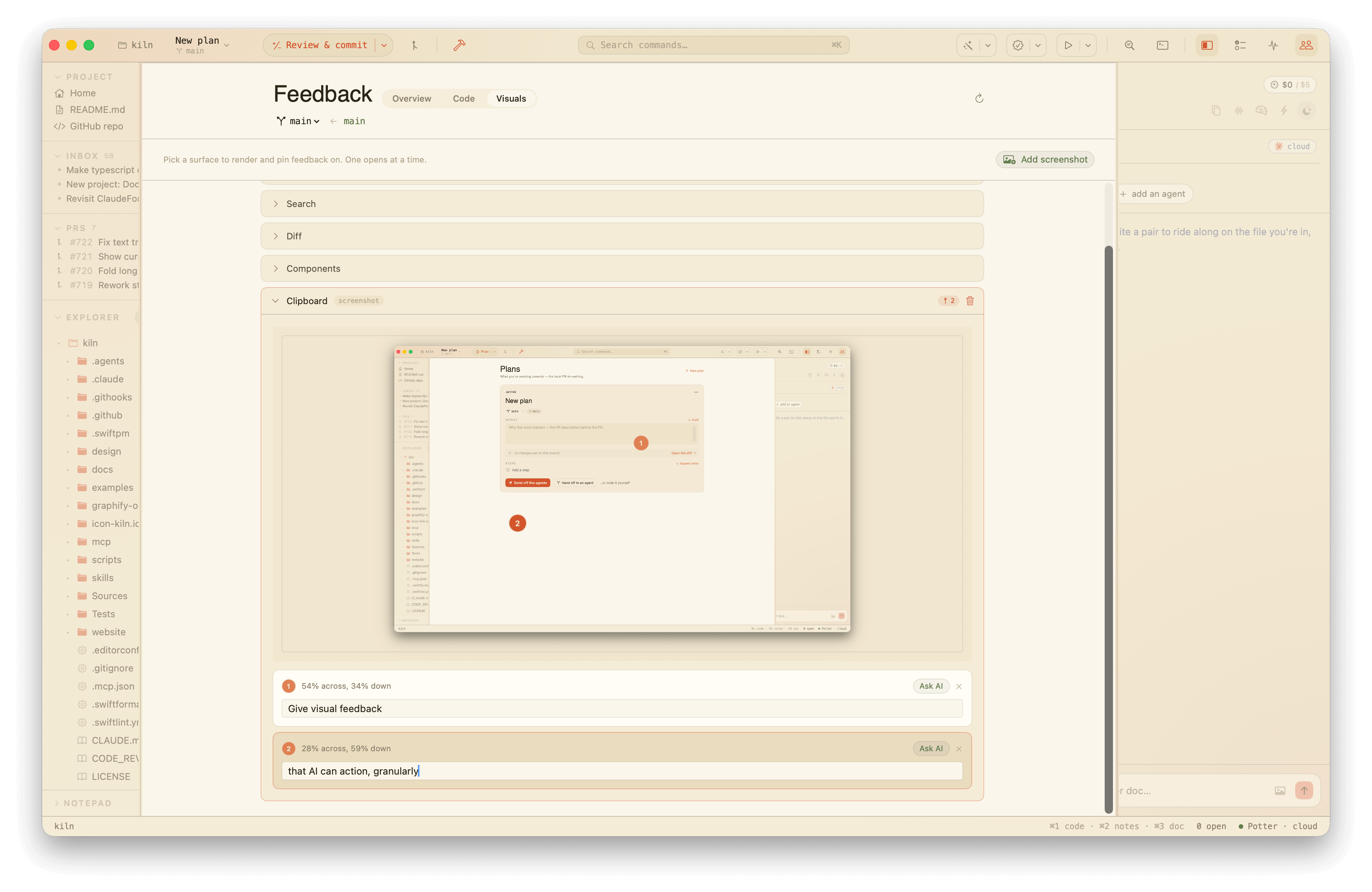
-
Approve or reject per file. Each file header carries approve (keep in the commit) and reject (hold back) toggles; tapping the same one again clears it. Unreviewed files commit by default, so the common path — glance, commit everything — stays one click. Rejecting is non-destructive: it only excludes the file from this commit, it doesn't touch the file on disk. The commit bar shows how many files are staged and how many are held back. Approving a file also collapses its diff, so your eye moves on to what's still pending; un-approving re-expands it.
-
Discard, deliberately. A separate trash action throws a file's working changes away. It's the one destructive action here, so it always asks first — it can overwrite work that hasn't been committed yet.
-
Don't commit local files. Before you save, Kiln flags any staged file that shouldn't be shared — its own machine-local
.localstate under.kiln/, a personal.claude/settings.local.json, or an embedded.claude/worktrees/checkout — in an amber banner above the diff, with a one-click Add to .gitignore that appends the right pattern under a labelled section. If the file is already ignored but tracked anyway (committed by mistake earlier), the banner says so and points atgit rm --cached, since a fresh ignore line alone won't drop it. -
On-device context. Explain asks the on-device model what the diff does and what a reviewer should look at, rendered inline above the files as rich markdown. It's opt-in, on-device only (free, private, and it fails quietly when no model is available), and never reaches the cloud.
-
Adversarial review. Review runs a skeptical, one-click code review over the diff — it hunts for bugs, regressions, and missing edge cases, leading with a verdict and a list of the most serious issues, rendered as markdown. Unlike the ambient Explain, this is a deliberate action, so it prefers the cloud model when a key is present and falls back to on-device otherwise.
-
Explain a few lines. Click a diff line to highlight it, shift-click another to stretch the run (clicking the same line again clears it) — the diff is read by the line, so selection is too. An Explain button pops up in the right margin, the same quick-edit affordance the editor shows. Run it and the answer lands as marginalia in that margin, pinned level with the lines it's about, rendered as rich markdown with the line range in its header. It prefers the cloud model when a key is present and falls back to on-device. Highlighting a new run drops the old answer.
Mapping a clicked element in the Visuals tab back to the source that rendered it — so a visual comment is already scoped to a file and line — is the next step, and lands with the React/DOM preview work.
Plans
If the Diff is the local pull request's Files changed, a plan is its cover letter — the thing the diff is trying to become. A loose hodge-podge of edits needs nothing here. But the moment the work has a destination — you click an issue, or you can name what you're building — a plan holds everything an opened PR would: a title, an intent (the why, before the PR description exists), the linked issue, and the base and working branch. The and more over a PR is a step checklist, so the diff you're growing has something to grow towards.
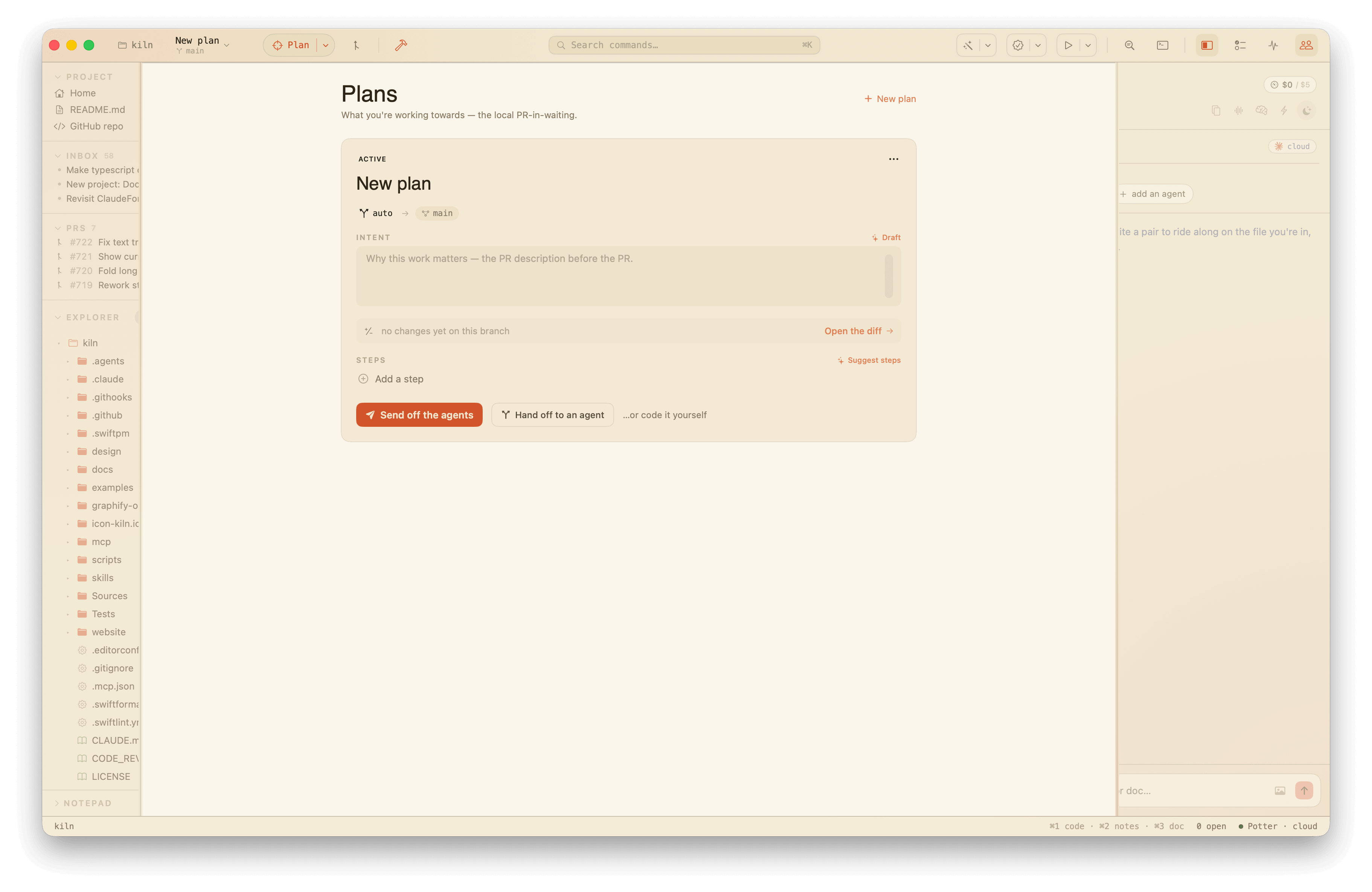
The current plan shows as a card you edit in place: rename it, write its intent, pick the base it's measured against, and watch a live diff summary (N files · +X −Y) with one click through to the full review. Tick steps off as you go. A plan moves between three states — active (what you're working towards now), parked (set aside, not abandoned), and shipped (it became a PR, or just landed) — and shipping or parking the current one hands "current" to the freshest plan that's still active. Other plans list below the cover, one tap from becoming current.
Start one from any Inbox row — every row carries a split button whose primary verb is add to plan when a plan is current, or make a plan when there isn't (its chevron always offers the other, plus hand off to an agent and, for issues, vet and scope). Make a plan spins up a fresh plan from the signal; add to plan drops the signal onto the current plan as a step that remembers where it came from — a source chip on the step — so the two backlogs (Inbox signals and plan steps) stop being retyped into each other. You can also start one from the + New plan button on the surface or the empty state. An issue resurfaces its existing plan rather than spawning a duplicate.
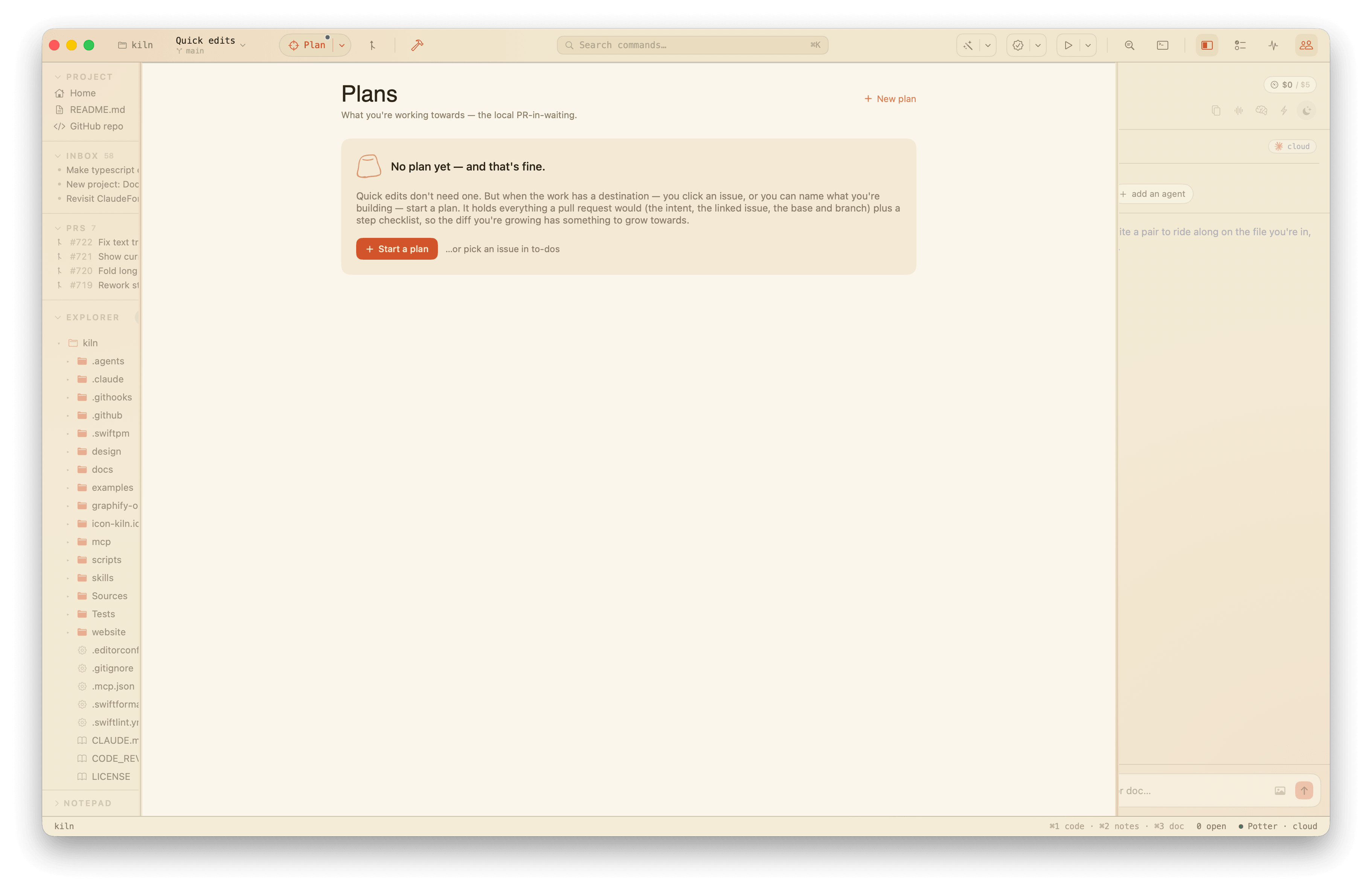
A failing CI run is a kind of Inbox signal too: its row has its own make a plan verb that opens a plan already pointed at what broke. The plan's name is the workflow and run title (Fix CI: build failed), its intent is seeded with the failing log (the same gh run view --log-failed the send an agent path fetches), and the cover carries a CI chip that links straight back to the run on GitHub. Like an issue plan, clicking the same run twice resurfaces the existing plan rather than duplicating it. The current plan also shows as a PLAN row in the sidebar's project section, so what you're working towards is a glance away.
Plans are yours, not the repo's: they live in .kiln/plan.local.json — per-user and gitignored, like loop run state — so each person's sense of "what I'm working towards" stays local until it's a real PR. Open the surface from the Plan split button in the title bar — it's the flow's first step — its dropdown's Plan row, the sidebar's PLAN row, or whenever a plan is active.
Tests (⌘U)
The project's own test suite as a per-test list, not just a one-line count. Run all from the surface — Kiln shells out to the project's own test command — and each test lands as a row with a pass, fail, or skip dot, failures sorted to the top. A failing row expands to its first assertion line, so you read what broke without scrolling the raw log.
Reruns are scoped. Each row carries a rerun button that runs just that test, and a rerun failures button at the top reruns only the last run's failing tests in one pass. A scoped rerun splices its fresh results over the table, so the tests it didn't touch keep their last-known status. The parser reads Swift Testing output and recognizes jest and vitest ticks and crosses; richer per-test detail for those shapes, and jump-to-definition on a row, are planned follow-ups.
Open it from the Open test runner link in the title-bar test button's menu, the Tests command (or Run All Tests, which opens the surface and kicks off a run), ⌘U, or the control port's show tests.
Search (⌘⇧F)
Project-wide content search — the IDE half that the in-buffer find bar (⌘F) doesn't cover. Type two characters and every file in the workspace is scanned as you type, with the same matching rules the find bar exposes: match case, whole word, and regex toggles, plus an ignore comments toggle (//) that drops any hit landing inside a comment. The comment spans come from the highlighter — the same source the NOTES margin reads — so it follows whatever each file's grammar calls a comment, and a // inside a string stays a match. Results group by file, the hit picked out in amber inside its line; clicking a row opens the file with the caret on that line, in the CODE view.
The scan walks the tree on demand with the ⌘P finder's ignore rules — no background index. Those rules are a static set of junk you never search (VCS metadata, dependency and build output, caches, Kiln's own .kiln) layered with the project's own .gitignore, so anything the repo already hides from git — generated files, build artifacts — stays out of results too. It's bounded everywhere (file size, per-file matches, total matches), so a huge tree degrades to a truncated answer with a note saying so, never a stall. Open buffers with unsaved edits are searched as you see them, not as the disk has them.
Replace rides along: a replacement field with replace all across the results, or per file from each group's header. Open buffers are edited in place — the buffer goes dirty and you save, like a squad proposal — while closed files are rewritten on disk. In regex mode the replacement honours $1-style capture groups. Replace respects the ignore-comments toggle too, so it changes exactly the hits the search showed and leaves comment text alone. A file group can also be waved away (✕) to keep it out of a replace-all; dismissals reset on the next search.
Recent searches stick around. A search that finds something is remembered (forward typing collapses, so "foobar" leaves one entry, not six), persisted to .kiln/search-history.local.json — the same per-user, gitignored .local.json convention plans use — and surfaced as tappable chips on the empty search surface, so a search you ran yesterday is one click from running again.
Open it from the title-bar magnifier icon, Find ▸ Find in Project… (⌘⇧F), or the control port's show search.
Visual feedback (⌘⇧V)
A pinboard for the UI itself. Pick one of Kiln's canonical surfaces — squad, inbox, search, diff, components — and it's rendered to an image. The inbox, search, and diff surfaces draw seeded demo content, so what you annotate is what a PR snapshot shows; the squad surface renders your live agents. Click anywhere on the image to drop a numbered pin; each pin gets a note field and an Ask AI button.
Asking sends the whole screenshot plus the pin's location ("62% across, 30% down") and your note to a vision-capable cloud model, which replies with focused feedback about that exact spot — hierarchy, spacing, contrast, copy. Without a cloud key it degrades to a text-only on-device read that reasons from the surface name and the location instead of the image. Pins, notes, and replies survive switching surfaces; re-rendering clears them, since they'd point at a stale image.
The point is a tight loop for design review: see the surface, mark what's off, get a second opinion, without leaving the IDE or wiring up a screenshot tool. Open it from View ▸ Visual Feedback (⌘⇧V) or the control port's show feedback.
Pull requests (⌘⇧U)
The project's pull requests in one place: open PRs up top, recently-closed (merged and closed) below, both read from gh pr list on demand — the same gh auth the to-dos view leans on, so it fails quietly when gh is missing, unauthed, or the repo has no remote.
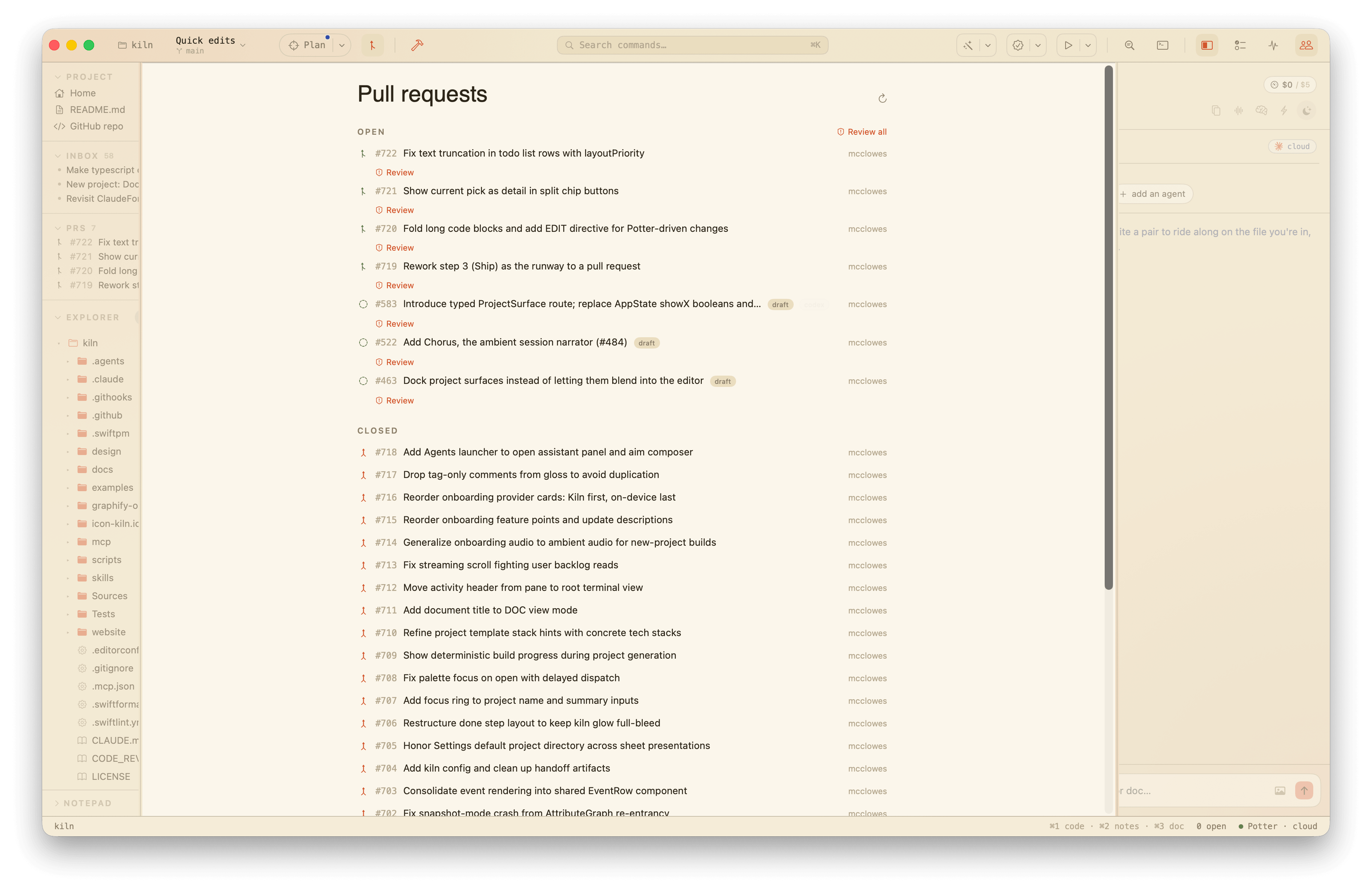 Each row shows the PR number, title, author, its state (open, merged, closed) as a colored glyph, a draft badge, and the PR's GitHub labels as colored chips.
Opening the surface (and the refresh button) also kicks off a background git fetch --prune alongside the gh list, so reviews and diffs against these PRs lean on fresh remote refs; a syncing… spinner in the header marks it while the list itself shows the moment gh answers. The rows come from gh over the API, which is always live — the fetch is for the local refs, not the list.
Open a row to see its detail: the PR body and its comments, fetched lazily from gh pr view the first time you open it. An open on GitHub button jumps to the PR in the browser (the URL is derived from the repo's origin remote, like the issue links in the to-dos view). A back arrow returns to the list.
Open PRs can be reviewed adversarially without opening them, your own included. Each open row carries a Review button, and the section header has Review all; either fetches the PR's diff (gh pr diff <n>), parses it, and runs the same skeptical reviewer the Diff surface uses — leading with a verdict and the most serious issues, rendered inline as a dismissable markdown card under the row. Review all is sequential and capped (the same restraint as bulk issue triage) so one click can't fan out into dozens of cloud calls. Like Review on the Diff view, it prefers the cloud model when a key is present and falls back to on-device.
Open it from the title-bar pull-request icon, the Pull Requests command, ⌘⇧U, or the control port's show prs.
The richer ideas from the request — chatting around an open PR to leave comments or drive iterations, and opening a context-carrying issue linked back to a closed PR — are a planned follow-up. The body parser already extracts the issues a PR closes (Closes #N / Fixes #N), which that follow-up will build on.
Settings window (⌘,)
The standard macOS Settings window — Kiln ▸ Settings…, or ⌘, — holds two tabs.
General is app-level, user-global settings: appearance (auto, light, or dark), editor font size, section breathing, tab-to-complete, auto save, the proactive squad, keeping the squad on-device, auto-running due loops, and clipboard history, all stored in user defaults. Project .kiln config still wins for the open workspace; when a project layer shadows one of these settings, the row says so.
Appearance defaults to Auto — every Kiln color is a light/dark pair that follows the system. Picking Light or Dark pins the whole app to one face regardless of the system setting; the choice applies across every window.
Codebase Config is what configures the open codebase, in one place: Kiln's own layers, LLM/agent configs, build and CI definitions, lint and format rules — found by name at the root, never by indexing. Rows open the file. Kiln's own config is layered inside .kiln/: config.json (project, committed) → config.<user>.json (one user's rules, committed) → local overrides. Later layers win. The merged result is summarized at the top of the tab. A one-time VS Code import maps the few settings Kiln understands; it's an import, not a sync. It reads the most recently edited settings.json across VS Code, Insiders, VSCodium, and Cursor, so it works whichever fork you live in.
The title bar's slider button, the View ▸ Codebase Config menu item, and the config command-palette entry all open Settings on the Codebase Config tab. (External drivers — the control port's show config and the config launch panel — do the same.)
Notepad (⌘⇧N)
A free-form per-project, per-user scratchpad at .kiln/users/<username>/notepad.local.md — things to do, things to remember, paste fodder. The squad's survey reads it, so notes steer agents. The .local suffix means "yours, not shared": gitignore .kiln/users/ by convention, like config.local.json. A legacy shared .kiln/notepad.md is moved into your file the first time the notepad is touched, so old notes survive the move.
Clipboard history is strictly opt-in: while enabled and Kiln is the active app, new copies are collected in memory. Nothing from the pasteboard ever touches disk.